Telegram hacked: how to recover the account
If a Telegram account is hacked or access is lost, it is important to move quickly and avoid chaotic attempts. Below is a practical sequence: where to watch for restrictions, where to write, and what to do in parallel to improve the chances of getting the account back.
1. Track when the restriction expires
If the issue is not resolved through support and you need to catch the moment when a temporary restriction is lifted, this page helps you monitor timing:
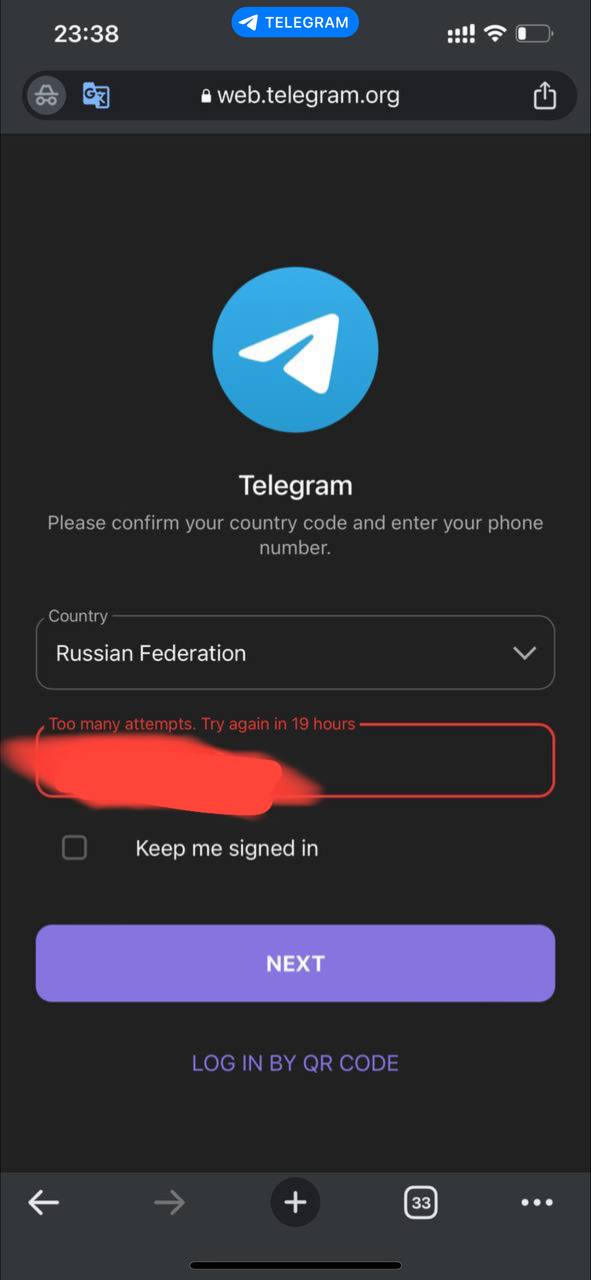
If access is temporarily limited, the goal is not to miss the exact moment when the restriction disappears and to try logging in immediately while the situation is still manageable.
2. Use an additional channel through X (Twitter)
You can also write here:
https://twitter.com/smstelegram
- follow the account;
- send the phone number and username;
- then add a short message explaining the reason for the request.
3. Write to Telegram support from another account
Another route is to message support inside Telegram from a second account. They may not always resolve the issue directly, but they can still register the case and sometimes help move it forward.
If the message is sent by someone other than the account owner, that should be stated right away.
How to write step by step
- Open Telegram from a second account.
- Go into the app settings.
- Open the Help section.
- Choose the support or “ask a question” option.
- Briefly explain which account was hacked, which phone number was linked, and what the username is.
- State that the message is not written by the owner if that is the case.
- Add an approximate date of the hack or loss of access if you know it.
Example message
Hello. I am writing regarding a Telegram account that appears to be hacked or inaccessible.
Username: @username
Phone number: +xxxxxxxxxxx
I would appreciate any guidance on how to restore access. Thank you.
What else should be done immediately
- Check whether the original phone number linked to the account still works.
- Do not give login codes to anyone, even if the message looks official.
- Do not use suspicious “instant recovery” services.
- Prepare all key data in advance: phone number, username, approximate date of access loss, and a short description of the issue.
- If login becomes possible again, immediately review active sessions and terminate unknown devices.
If access is restored
- Immediately terminate all unfamiliar sessions.
- Check the linked phone number and email if email is used.
- Enable two-step verification.
- Update the Telegram cloud password if it was used earlier.
- Check whether the name, username, and settings were changed.
If the Telegram account is important, it is usually better to work in parallel through several directions: track timing through Web, write through X, and contact support from another account. The key is not speed alone, but disciplined speed.
Need help with a Telegram account?
If you need help restoring a Telegram account, reviewing the situation, or setting up security after access is recovered, you can message us directly.
Ask a question